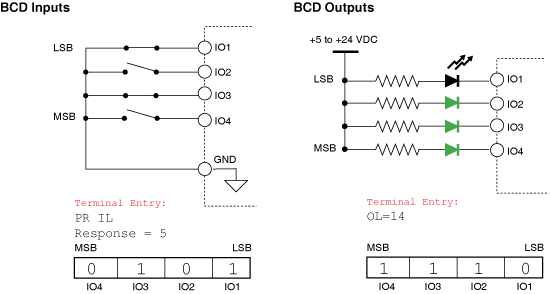
Like All MDrive variables, the I/O point configuration can be declared two ways:
Globally
Locally
Global:
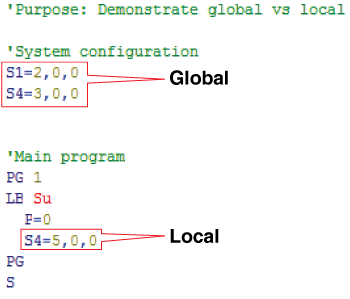
Global I/O configurations, are declared outside the main body of the program. These are more typical and are used when you want the I/O point to have the same function at all times.
Local:
Local configurations are declared inside the body of the program and are stored in RAM, thus may be changed on the fly. An example would be where you may want an input to output to perform one function in part of the program and another in a different part of the program.
Event triggering
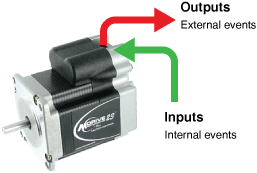
The most common use of the I/O is to trigger events within a system:
Inputs: to trigger events internal to the MDrive program.
Outputs: to trigger events within a machine or system.
Input example:
The following program example shows an input used to trigger an internal event:
The following program will move the axis to an absolute position based upon the state of I/O 1 and will hold that position until the state changes.
In this example, the program will use a conditional branch (BR) to activate the event. Input-driven events may also use the Call Subroutine (CL) command in a similar fashion.
S1=0,0,0       'setup io point

'***program***
PG 100        'enter program mode at address 100
LB SU         'label program to start on power on
LB ba         'label ba is a loop point

'*** input event actions***
BR bb, I1=1   'conditional branch to bb if input 1=1
BR bc, I1=0   'conditional branch to ba if input 1=0

'*** input event 1***
LB bb         ' create process bb
MA 51200      'move to absolute position 51200
H0            'hold until motion ceases
BR ba         'loop to ba

'*** input event 0***
LB bc         'create process bb
MA 0          'move to absolute position 0
H0            'hold until motion ceases
BR ba         'loop to ba

'***end***
E
PG
Output event
The following program example shows an output used to trigger an external event. A real-world example may be that the MDrive performs and completes a task, when complete the program will activate an output to trigger an external process, such as executing a program in a second system MDrive.
S1=0,0,0  'setup IO1
S2=16,0,0 'setup IO2

'***program***
PG 100
LB SU
LB ba     'label ba as return point
MR 512000
H0

'***initiate external event***
O2=1          'set output 2 active

'***wait for input to restart***
LB bb         ' label bb as loop point
BR bb, I1=0   'loop to bb, input 1 inactive
BR bc, I1=1    'branch to bc, input 1 active

'***restart program on input event***
LB bc          'label bc as clear O2
02=0           'set output 2 inactive
BR ba          'restart program
E
PG
Using a Bank of I/O
The MDrive I/O can read inputs and write outputs as a group in Binary Coded Decimal (BCD).
The I/O may be connected as shown below. For purposes of example, we have used switches for inputs and LED’s for outputs. All are configured as general purpose, active when low, sinking.
For this example we will use two basic programs:
Inputs: A program that will perform a specific move based on the input decimal value.
Outputs: A program that will cause the outputs to operate as a binary up counter.
Move on BCD Input Example
The following application will move the motor to a variety of positions based upon a binary input to I/O 1-4. One of the things this application shows is one of the new Microstep Resolution settings that give the ability to set motion to occur in 0.001˚ increments. The program does a calculation after each move to show motor position in degrees. To make the web view shorter, the example below omits many repetitive branch routines for the various moves. See the
full program
to view.
'******Global Setup Parameters****
S1=0,0,0  'I1-4 set as GP,LOW Active, sinking
S2=0,0,0
S3=0,0,0
S4=0,0,0
P=0
Ms=180    'Microstep Res to 0.001 deg/ustep

'******Main Program*********
PG 1
LB aa
R1=Il          'Set register 1 = inputs 4-1
BR z1,R1=0     'conditional branches based
BR za,R1=1     'upon the value of IL
BR zb,R1=2
BR zc,R1=3
BR zd,R1=4
BR ze,R1=5
BR zf,R1=6
BR zg,R1=7
BR zh,R1=8
BR zi,R1=9
BR zj,R1=10
BR zk,R1=11
BR zl,R1=12
BR zm,R1=13
BR zn,R1=14
BR zo,R1=15
BR aa

'*******Program Motion Components*******

LB z1
BR aa, P=0     'branch to main prog, position=0
MA 0           'index to abs. pos. 0
H              'Suspend prog. until move completes
CL zz          'call the print position sub.
BR aa          'BR to main prog when complete

LB za          'same as above
BR aa, P=36000
MA 36000
H
CL zz
BR aa

LB zb
BR aa, P=-36000
MA -36000
H
CL zz
BR aa

LB zc
BR aa, P=18000
MA 18000
H
CL zz
BR aa

LB zd
BR aa, P=-27000
MA -27000
H
CL zz
BR aa

LB ze
BR aa, P=9000
MA 9000
H
CL zz
BR aa

LB zf
BR aa, P=-9000
MA -9000
H
CL zz
BR aa

LB zg
BR aa, P=4500
MA 4500
H
CL zz
BR aa

LB zh
BR aa, P=-4500
MA -4500
H
CL zz
BR aa

LB zi
BR aa, P=3000
MA 3000
H
CL zz
BR aa

LB zj
BR aa, P=-3000
MA -3000
H
CL zz
BR aa

LB zk
BR aa, P=6000
MA 6000
H
CL zz
BR aa

LB zl
BR aa, P=-6000
MA -6000
H
CL zz
BR aa

LB zm
BR aa, P=7500
MA 7500
H
CL zz
BR aa

LB zn
BR aa, P=-7500
MA -7500
H
CL zz
BR aa

LB zo
BR aa, P=0
MA 0
H
CL zz
BR aa

'****Print Position Subroutine****
LB zz
R2=P/100       'set register 2 to position/100,
               'this will display degrees as the unit
               'of measure for motor position
PR "Position Selected = ",R1
PR "Absolute Position (Degrees) = ",R2
RT

E
PG
Binary up counter – BCD output example
The following program example shows the use of the lower output bank as a binary up-counter. IO1 – IO4 are setup as general purpose outputs, active when HIGH, sinking. The main program will set the outputs, store the decimal equivalent of the outputs, and index the motor a multiple of the output state. Once complete it will increment the register and repeat until the value of the register =15 (binary 1111). It will then clear the register, set the outputs to 0, and restart the process.
'***Global Setup Parameters***
S1=16,1,0	'O1-4 Set as GP, High Active, Sinking
S2=16,1,0
S3=16,1,0
S4=16,1,0

'***Main Program***
PG 1
LB aa
CL xx, R1<15	'Call sub xx R1 less than 15
CL zz, R1=15	'Call sub zz R1 equal 15
BR aa

'***Subroutines***
LB xx	'subroutine increments R1, moves motor
R1=R1 1	'multiple of R1 value
Ol=R1	'sets output group to R1
H 1000	'hold program execution for 1 sec.
MR R1*100000	'move relative R1 x 100000 steps
H	'hold until motion completes
RT	'return from subroutine

LB zz	'subroutine to resets R1 to 0
R1=0	'and restart process
RT	'return from subroutine

E
PG