




Controllers & Software
WinMarkpro
Laser marking software compatible with FH Flyer & Flyer 3D scanning heads







WinMarkpro
Laser marking software compatible with FH Flyer & Flyer 3D scanning heads
Overview
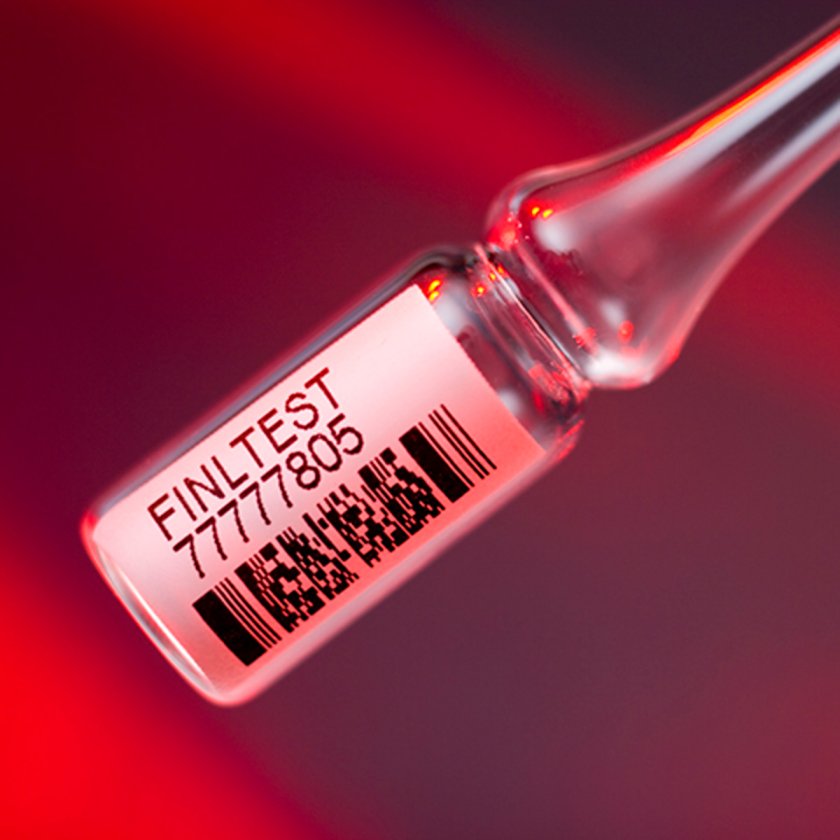
About WinMarkpro Software WinMarkpro laser marking software was developed to work exclusively with FH Flyer and Flyer 3D scanning systems and is included with every FH Flyer and Flyer 3D Scanning System. Software updates are available via website downloads. WinMarkpro is a Windows® based software and includes all the type fonts available through Windows. With more than a dozen embedded barcode systems, several stroke fonts for high-speed marking, and the availability to import high-resolution raster and vector graphics, WinMark Pro covers a wide variety of laser marking applications. WinMarkpro can also accommodate detailed cutting of thin materials. Making precise, detailed laser cuts on electronic thin films, paper, plastics, and thin metals can be accomplished with WinMarkpro and the proper laser and scanning head combination.
- WinMarkpro is an ActiveX control empowering you to create high performance stand-alone laser marking applications using the most potent development suites you’re already familiar with, including Microsoft Access, Office, Visual Basic, Visual C++, and Delphi. Laser mark serial numbers directly from your Access database application.
- Use “Best Fit” to import and mark a logo at 66% of your lens field size or choose “One to One” when precise dimensional drawings must be marked accurately
- From your process automation controller set/clear WinMarkpro inputs or monitor WinMarkpro via operator input bit status. Define Event Builder commands to run before or after each piece or mark session.
- Create a 2D Bar Code the add human-readable stroke text. Send new bar code data to WinMarkpro via operator input or through an RS-232 serial port. Automatically increment serial numbers or add customized date and time information.
- Fine-tune your images by adding or deleting lines, circles, polygons or vary marking properties such as Power, Velocity, Resolution, etc. by object.
- WinMarkpro enables interfacing with parts handling equipment and other computers for easy automation control.
Software Versions
WinMarkpro v6.3 compatible with FH Flyer scanning head, use Firmware Update 3-90.fhz. Click on the corresponding Documents links below to download and install the newest firmware release for FH Flyer Scanning Heads and WinMark Pro version 6.3. Open WinMark Pro under the Help Menu, select Upgrade Flyer Firmware. To download open source software modules and/or a copy of the GNU GPL license, click on the corresponding Documents link below. Flyer 3D Scanning Heads incorporate certain free open source software modules distributed under GNU General Public License Version 2, GNU Lesser General Public License Version 2.1, and The FreeType Project License. Under terms of these licenses, the source code for these modules is available to all users. Note: for USB communication with FH Flyer, the separate WinMarkpro USB Coms Driver Installer listed below also needs to be downloaded and installed in addition to Winmark 6.3 before physically plugging in your USB cable.
WinMarkpro v7 compatible with Flyer 3D scanning head, use Firmware Update 4-84.fmz. Click on the corresponding Documents link below to download and install the newest firmware release for Flyer 3D Scanning Heads and WinMarkpro version 7. Copy and run the self-extracting EXE file on your hard drive. Open WinMarkpro under the Help Menu, select Upgrade Flyer Firmware. To download open source software modules and/or a copy of the GNU GPL license, click on the corresponding Documents link below. Flyer 3D Scanning Heads incorporate certain free open source software modules distributed under GNU General Public License Version 2, GNU Lesser General Public License Version 2.1, and The FreeType Project License. Under terms of these licenses, the source code for these modules is available to all users.
- Filter by Type
- Firmware/EDS
- Software
- Software Manual
- Flyer
| Download | Download Type | Language |
|---|---|---|
| WinMarkpro Firmware Update 4-84 | Firmware/EDS | English |
| WinMarkpro v7 | Software | English |
| WinMarkpro Firmware Update 3-90 | Firmware/EDS | English |
| WinMarkpro v6.3 | Software | English |
| WinMarkpro USB Coms Driver Installer | Software | English |
| WinMarkpro v7 Release Notes | Software | English |
| WinMarkpro v6 Release Notes | Software | English |
| WinMark Pro User Guide | Software Manual | English |
| About WinMarkpro | Software Manual | English |
| WinMark Radial Marking Application Note | Flyer | English |
| WinMark UID Composite Codes Application Note | Flyer | English |
| WinMark Modbus Protocol Application Note | Flyer | English |
| WinMark Banner Tracking Application Note | Flyer | English |