MODBUS/TCP (Connect to port 502)
MODBUS/TCP is a standard protocol designed for multidrop networks based on a client-server architecture communicating over TCP/IP.
MCode/TCP (Connect to port 503)
MCode/TCP is a protocol based upon the MDrive programming language using 1 and two character mnemonics.
Depending on the port selected (ip.address:502 or ip.address:503) the device operation will differ significantly. When connected to port 502 the device will respond to standard MODBUS/TCP function code formats. Commands will map to register addresses and follow the MODBUS/TCP message format. Most importantly, MODBUS/TCP follows a client-server networking model. The device is able to receive commands in immediate mode only.
When connected to port 503, the device will operate like the RS-422/485 products with the exception that party mode commands and features are disabled, as multi-drop communications are addressed via IP.
Comparison
Function
MODBUS/TCP
MCode/TCP
Networking model
Server (Client-Server network)
Programmable node
Port
502
503
Command format
6 standard function codes, 2 mfg specific function codes
Standard MCode mnemonics
Programmable
No
Yes – Standard MCode program format
Communication modes
Immediate mode functions only
Immediate and program mode
Complexity
Complex
Simple 1 and 2 character mnemonics
Compatibility with programs from RS-422/485 MDrive products
None
Fully compatible with non-party mode programs.
Recommended use
Use in systems unified by the MODBUS protocol.
Use in systems where multiple device types communicating using the same protocol isn’t required.
MCode/TCP (Port 503)
MCode is the programming and control language utilized by MDrive Motion Control products developed to communicate over RS-422/485. MCode/TCP is MCode communicating over TCP/IP. The language consists of an extensive command set made up of 1 and 2 character mnemonics.
When connected to ip.address:503 the MDrive will automatically be in MCode/TCP mode. In this mode the device is fully programmable and will operate identical to the RS-422/485 products with the exception that multidrop communication is accomplished using individual IP addresses instead of party-mode names. Global commands are sent using the UDP protocol to address 255.255.255.255.
The key advantages of MCode/TCP:
Ease of connection using commonly available RJ-45 connectors and CAT 5 cabling.
Elimination of complicated party mode communication wiring and configuration.
Higher speed, less error prone than RS-422/485.
MODBUS/TCP (Port 502)
MODBUS is a communications interface developed in 1979 by PLC manufacturer Modicon, Inc. (now a brand of Schneider Electric). MODBUS is designed for multidrop networks based on a master-client architecture.
The availability of devices using MODBUS has made it a de facto standard for industrial communications network. Modbus was originally developed for use with serial communications interfaces such as RS-232 and RS-485, MODBUS communications over TCP/IP has become a standard because of the ease of interface and simpler message format
When connected to ip.address:502 the MDrive will automatically respond to MODBUS/TCP protocol function codes only. Note that when operating the MDrive using MODBUS/TCP it is not programmable and can only use immediate command functions.
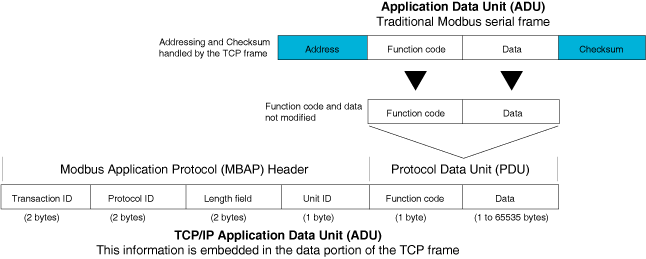
MODBUS/TCP message format
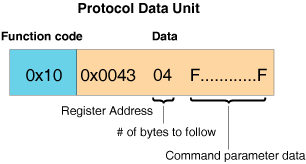
Protocol Data Unit (PDU)
The MDrive command information is contained in the PDU and consists of the function code. The data block will contain the address of the register which relates to an MDrive command, and the data of the command in hexadecimal format. MODBUS/TCP communications are in Big Endian form (Most Significant Byte first (MSB))
Supported function codes
dec
hex
function
Device ID
43/14
0x2B/0x0E
Read device identification
Public Function Codes
01
0x01
Read coils (digital outputs)
02
0x02
Read digital inputs
05
0x05
Write single coil (digital output)
03
0x03
Read holding register
16
0x10
Write multiple registers
Manufacturer Specific Function Codes
65
0x41
Read I/O and trip configuration and parameters
66
0x42
Write I/O and trip configuration and parameters, enter upgrade mode.